A bedroom can serve as a calm retreat and a practical workplace, but sharing one room takes thoughtful planning. The key is not buying a perfect desk. It is making work feel distinct from rest, even when the available space is only a few feet wide. How to create a productive home office in a bedroom corner? Start by noticing how the room is used: where daylight falls, where cables can run safely, and whether work calls might disturb someone sleeping.
Ergonomics offers a useful guide. Industrial designer Niels Diffrient is associated with the principle, “The best posture is always your next posture.” It is a reminder to change positions, not chase one flawless setup. Place a compact desk near natural light, angle the screen to reduce glare, and keep the keyboard close enough that your shoulders can relax. A supportive chair helps, but so does standing briefly between tasks. Small details matter. A warm desk lamp, a cable tray, and a shallow drawer can make a corner feel orderly without taking over the bedroom.
Then create a clear end to the workday. Put papers in a lidded box, close the laptop, and switch off the task light. These cues help separate work from rest. Some bedrooms have awkward outlets or little daylight; a neat setup cannot fix everything. That is worth admitting. Still, a few deliberate changes can make the corner more comfortable, focused, and easier to leave behind at night.
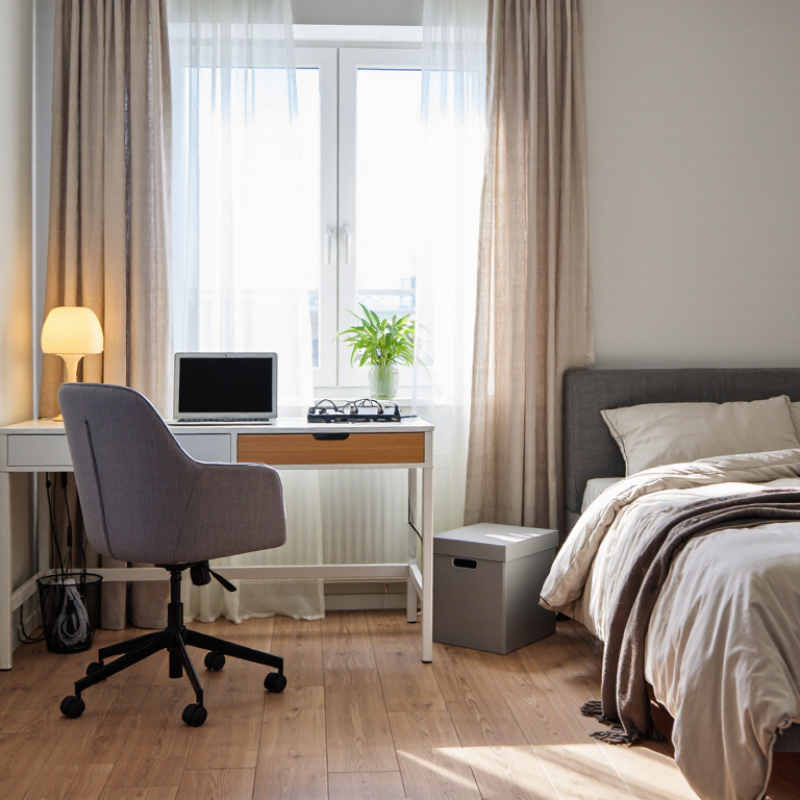
Assess the bedroom before buying a desk. Note window position, outlets, glare, noise, and the path between bed and workspace. Measure the available floor area, including chair clearance and drawer access. The U.S. Bureau of Labor Statistics’ 2023 American Time Use Survey found that 35% of employed people did some or all of their work at home on workdays. A bedroom office is not unusual. But a setup squeezed beside the bed may still interrupt sleep or concentration.
Define the work you actually do. Video calls need a quiet background and steady light; detailed tasks need a clear, stable surface. List your equipment, then check whether a chair lets your feet rest flat and your screen sit near eye level. OSHA’s Computer Workstations eTool recommends arranging monitors and input devices to support a neutral posture. Measure before moving. Keep work materials in one contained zone, such as a narrow desk with a cable tray, rather than spreading papers across the bed. Be honest about compromises: a window can brighten calls, yet create screen glare. I would reassess the layout after a normal workday; the first plan may look tidy but feel cramped.
Choose a spot near a window if possible, but avoid placing your desk directly beside the bed. A small corner can work: measure the desk, chair, and drawer space before moving furniture. Keep a clear path to the door, and use a rug or narrow shelf to mark the office zone without blocking light. It need not look perfect. A desk that feels convenient at noon may feel intrusive at bedtime, so test the layout for a few days.
Daylight can support a more comfortable work routine. A 2014 study of 49 office workers, published in the Journal of Clinical Sleep Medicine, found that workers with windows received 173% more white-light exposure during work hours and slept about 46 minutes longer. The study shows an association, not proof that windows caused better sleep; a bedroom also needs to remain restful. Use a curtain or a movable screen to soften glare and visually separate work from sleep. For screen placement, OSHA’s computer workstation guidance recommends keeping the monitor roughly 20 to 40 inches from the eyes, with its top at or below eye level. Try the setup before drilling shelves or buying storage. Small adjustments matter.
Choose a desk that fits the room without blocking drawers, closet doors, or the path around the bed. A wall-mounted desk or a narrow table can preserve floor space, but check its depth before buying. You need room for a screen, keyboard, and forearms—not just a laptop. A chair that slides fully underneath keeps the room easier to move through. Leave a small gap between the desk and curtains or bedding. Small detail. A drawer unit on wheels can hold chargers and notebooks, then tuck away when work ends. Measure twice; bedroom corners often look larger than they are.
For essential equipment, start with a supportive chair, a stable screen stand, and a separate keyboard and mouse if you use a laptop for long sessions. Set the screen near eye level and keep the keyboard low enough for relaxed shoulders. A task lamp with an adjustable arm helps direct light onto paper without shining into your eyes. Add a power strip with enough outlets, and secure loose cables along the desk leg to prevent snags. I would avoid filling every surface with organizers; they can become clutter too. Test the setup for a few workdays, then move items that cause reaching, glare, or discomfort.
A bedroom office works best when its lighting supports both screen work and the room’s other uses. Place the desk near a window, but angle the monitor to avoid reflections across the screen. On cloudy days, or after sunset, use an adjustable desk lamp aimed at your notes rather than directly at your eyes. A soft background light can also reduce the contrast between a bright screen and a dark room. Small changes matter. I still find that a lamp positioned slightly too close can create distracting shadows, so adjust it while seated.
Set up the chair and screen before settling into a long work session. Keep both feet supported, with knees roughly level with your hips, and let your shoulders relax while typing. If you use a laptop, raise its screen and add a separate keyboard and mouse. This small adjustment can prevent hours of looking down. Keep frequently used items within easy reach, but leave enough desk space for your arms. The ideal setup may take a few tries.
Reliable connectivity matters in a room that may sit far from the router. Test a video call from your desk, not just from the hallway, and move the router or desk if the signal drops. A wired connection can help when Wi-Fi is inconsistent and a cable can be routed safely. Secure loose cables along a wall to keep the floor clear. I once blamed a slow call on the network before noticing a weak signal in the bedroom; checking first would have saved time.
| Setup Dimension | Practical Target | Bedroom-Friendly Action | Quick Check |
|---|---|---|---|
| Desk location | Choose a stable work surface with enough room for the computer, keyboard, and frequently used items. | Place the desk where it does not block the doorway or walkways. If possible, position it near a window while keeping the screen out of direct glare. | There is clear space to sit down, stand up, and open drawers without moving bedroom furniture. |
| Ambient lighting | Around 300–500 lux is a common target for general office work; the appropriate level depends on the task and the person. | Use soft, even room lighting and supplement it with a task lamp. Adjust the lamp so it lights the work surface without shining into the screen or your eyes. | Printed text and keyboard keys are easy to see, with no harsh reflections on the monitor. |
| Screen position | Keep the screen roughly an arm’s length away, commonly about 50–70 cm, and place the top of the display at or slightly below eye level. | Raise a laptop on a stand or stable support and use a separate keyboard and mouse for extended work. | Your head stays upright and you can read the screen without leaning forward or tilting your chin up. |
| Chair and posture | Adjust the seat so feet are supported and shoulders can relax. Keep elbows near your sides with forearms approximately level with the keyboard. | Use a footrest or a stable support if your feet do not reach the floor. Sit back so the chair supports your lower back. | Your feet are supported, wrists remain straight while typing, and you are not reaching up to the desk. |
| Keyboard and mouse | Place them close enough to use without reaching; keep wrists in a neutral, straight position. | Leave room in front of the keyboard for a comfortable resting position, and keep the mouse beside it at the same level. | Your elbows remain near your body and your shoulders do not lift while working. |
| Glare and window light | Reduce reflections and strong contrast between the display and its surroundings. | Use adjustable blinds or curtains. Try placing the screen perpendicular to the window rather than directly facing it or turning its back to it. | Text remains clear at different times of day without needing to increase screen brightness excessively. |
| Internet connection | Use a reliable connection suited to video calls, file transfers, and other work requirements. | Position the work area where the wireless signal is dependable. If practical, use a wired network connection for a more consistent link. | Test a video call from the actual desk location and check for interruptions or weak signal. |
| Power and cables | Keep power connections accessible and cables secured away from feet and walkways. | Route cables along the desk or wall with clips or ties. Avoid overloading outlets or running cords under rugs. | No loose cable crosses the path between the desk, bed, and doorway. |
| Noise and focus | Reduce avoidable distractions while preserving a comfortable bedroom environment. | Use a consistent work-time routine, silence nonessential notifications, and consider soft furnishings to reduce room echo. | Work materials can be put away at the end of the day so the desk does not dominate the sleeping area. |
| Movement and breaks | Change posture regularly rather than remaining seated in one position for long periods. | Take brief movement breaks between tasks and look away from the screen periodically to relax your eyes. | Set a reminder to stand, stretch, or walk at intervals that fit your work schedule. |
A bedroom office works best when supplies have a fixed home. Keep daily tools in a shallow tray: pens, a charger, sticky notes, and one notebook. Store spare paper and cables in a labeled box under the desk. This keeps small items from spreading across the bed or nightstand. Leave only what you use each day within reach.
Owl Labs’ 2023 State of Remote Work report found that 62% of surveyed workers felt more productive working remotely. A clear work surface can make it easier to begin, but it needs a boundary. Put the desk against a wall, not beside the bed if space allows. When work ends, close the laptop, return the notebook to its tray, and switch off the desk lamp. A simple ritual. Buffer’s 2023 State of Remote Work report found that 22% of respondents struggled to unplug. A visible stopping point may help, though it will not solve every distraction.
Keep the bed for rest, not as a backup desk. If the room is tight, use a folding table and store it after work. Keep work documents out of sight, perhaps in a lidded box. I still find this easy to neglect: one open notebook can quietly invite another task. A curtain or screen may soften the visual divide, but it should not block airflow or access to the desk.
Measure floor space, chair clearance, drawer access, and the path to the door. Note outlets, window glare, and noise. Measure twice.
A small corner near a window can work. Avoid placing the desk directly beside the bed, and keep a clear path around furniture.
Use a curtain, movable screen, rug, or narrow shelf to mark the office zone. Keep work materials in one contained area. It may still feel intrusive at bedtime.
A narrow table or wall-mounted desk can save floor space. Check its depth for your screen, keyboard, and forearms before buying.
Consider a supportive chair, stable screen stand, separate keyboard and mouse, and adjustable task lamp. A tidy surface helps, but too many organizers can become clutter.
Keep it roughly 20 to 40 inches from your eyes, with the top at or below eye level. Adjust the chair so your feet rest flat.
Soften window glare with a curtain or movable screen. Secure loose cables along a desk leg, and direct the lamp toward paper, not your eyes.
A study of 49 office workers found more daylight exposure and longer sleep among workers with windows. It showed an association, not proof of cause. Daylight can also create screen glare.
Creating a productive home office in a bedroom starts with understanding the room’s layout, available space, and the tasks you need to complete. Choose a quiet, practical location, then define a distinct office zone that does not interfere with the bed or walking paths. If space is limited, consider a compact desk, a supportive chair, and equipment that serves more than one purpose. How to create a productive home office in a bedroom corner? Make the most of the area with carefully measured furniture, tidy cable management, and storage that keeps essentials close without adding clutter.
Good lighting, comfortable posture, and a reliable internet connection help make the workspace pleasant and efficient. Use task lighting where needed, adjust your chair and screen to support comfortable working, and organize supplies so they are easy to reach. At the end of the day, put work materials away and use a simple routine to signal that work is finished. Keeping the office zone visually and practically separate from your sleeping area can support both focus and rest.

Lullaby Furniture